
Trucking Document Management
Find the report, certificate or repair evidence when someone asks. Basic includes 50 MB of storage. Pro adds 10 GB, Atlas scanning and full broker or DOT inspection PDFs.
Find your carrier record and documents.
Basic $19/month or Pro $49/month.
50 MB with Basic. 10 GB with Pro.
Basic gives you space for essential carrier documents alongside your record and inspection updates. Pro adds 10 GB of storage, live file scanning and Atlas to help you understand and organize the paperwork.
With Pro, give your office staff their own logins. If a document is missing, assign someone to get it and set a due date.
Save documents where you will look for them.
Save a repair invoice with the truck and inspection it relates to. Keep qualification documents in the driver’s file and company documents ready for broker or insurance requests.
You can open the original at any time. Your notes and repair evidence sit alongside the official report, so the file tells you both what happened and how you responded.
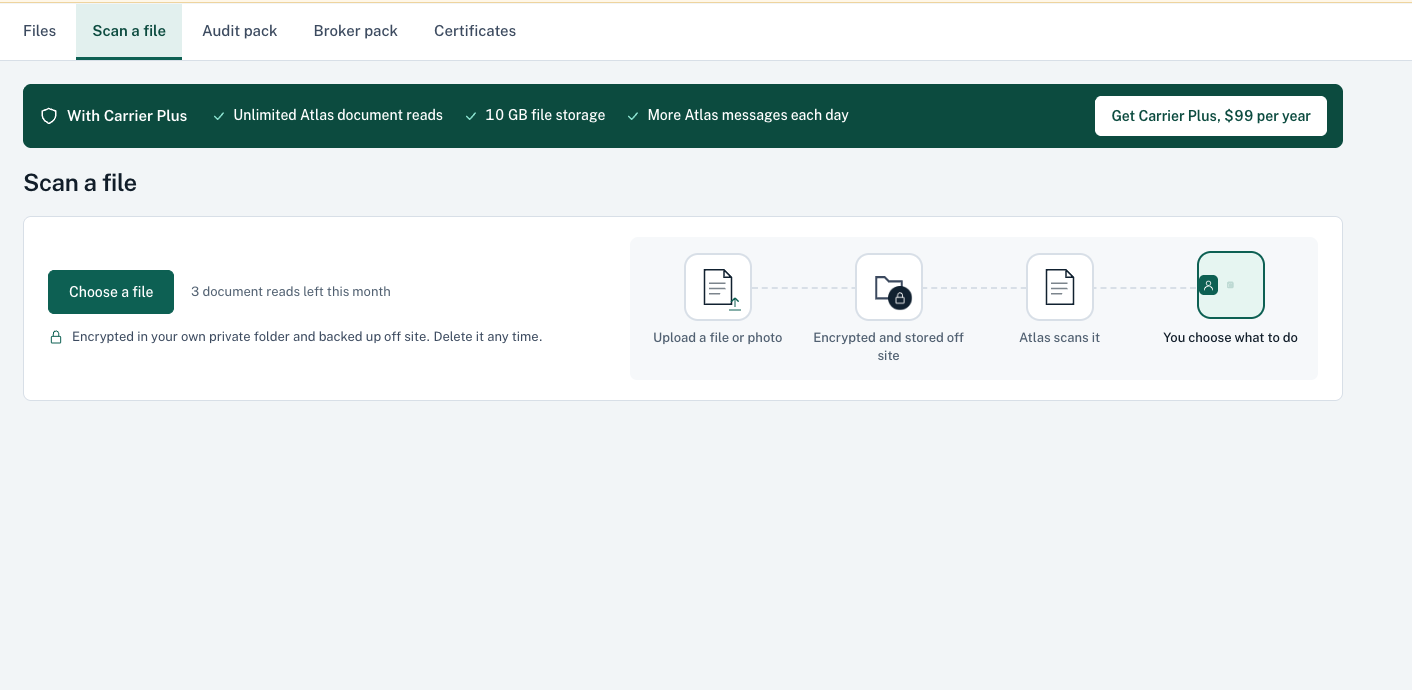
Photograph the report. Atlas reads it.
Upload a document or take a clear photo. Atlas reads it and shows you the names, dates and other details it found. Check them, then save the file, create a task or ask for help.
A roadside report can be uploaded before the inspection appears in the published record. You can deal with the paperwork you already have rather than waiting for the online entry.
- Upload the file or take a clear photograph.
- Check the extracted names, dates and findings.
- Save it with the driver, truck or inspection it belongs to.
- Add a task if there is something you need to do.
Get your audit documents ready.
Choose the records requested for the audit and assemble them in one pack. Inspection reports, qualification records and supporting evidence can be checked before you send them.
If the investigator asks for more, add the request to your task list. Check which documents you have and who is collecting the rest.
A broker packet for the next load.
Select the company documents the broker needs and send one link. Your insurance certificate, authority information and requested business paperwork stay organized for the next request.
Share your live record page when a broker or insurer asks to see your carrier information. For documents, use the selected packet so they receive the files needed for that request.
Set an expiration date or stop access when the link is no longer needed. Only the selected material is shared; your driver files and internal notes stay in your account.
Find the evidence after the job is finished.
Keep the report, correspondence and proof of completed repairs together. Months later, you can answer a question about the inspection without relying on someone remembering an email attachment.
Open a calendar entry or task to find the report and documents you saved with it.
A full broker PDF or DOT PDF for any inspection.
Choose the inspection, review its findings and add the supporting records. Pro exports the information as a full broker PDF or DOT PDF, so you can send a complete document instead of a string of screenshots.
If someone needs several documents, put them in a broker or audit pack and send one link. You can set an expiration date or stop access later.
Official sources
Reviewed November 21, 2026.
Questions and answers
Can I upload a photo from my phone?
Yes. Use a clear image of the complete document and check the details Atlas reads from it.
Can I stop access to a shared pack?
Yes. Set an expiration date for the link or stop access when it is no longer needed.
Does scanning alter the original report?
No. You retain the original file. Extracted details and your follow-up are stored separately.
Related guides and tools

Carrier Packet Checklist
Get your carrier packet ready for a broker. Check company details, authority, insurance and W-9 requests, then send the current documents securely.
Read more
DOT Audit Checklist
Getting ready for a DOT audit? Use this checklist to gather driver, vehicle, hours-of-service and company records, check the files and track what is missing.
Read more
How to Read a DOT Inspection Report
Read a DOT inspection report from company details to violation codes and out-of-service instructions. Check what needs correcting and which records to keep.
Read moreSee your inspection alerts.
Basic $19/month or Pro $49/month. Cancel anytime.